Regression From Scratch: Predicting Numbers and Understanding Relationships
Linear regression, logistic regression, and the causation trap
1. The Problem: Predict a Number
Someone gives you data: house square footage and sale price. You want to predict the price of a new house based on its size. Not a category — an actual number.
That’s regression: predict a continuous value from one or more input features.
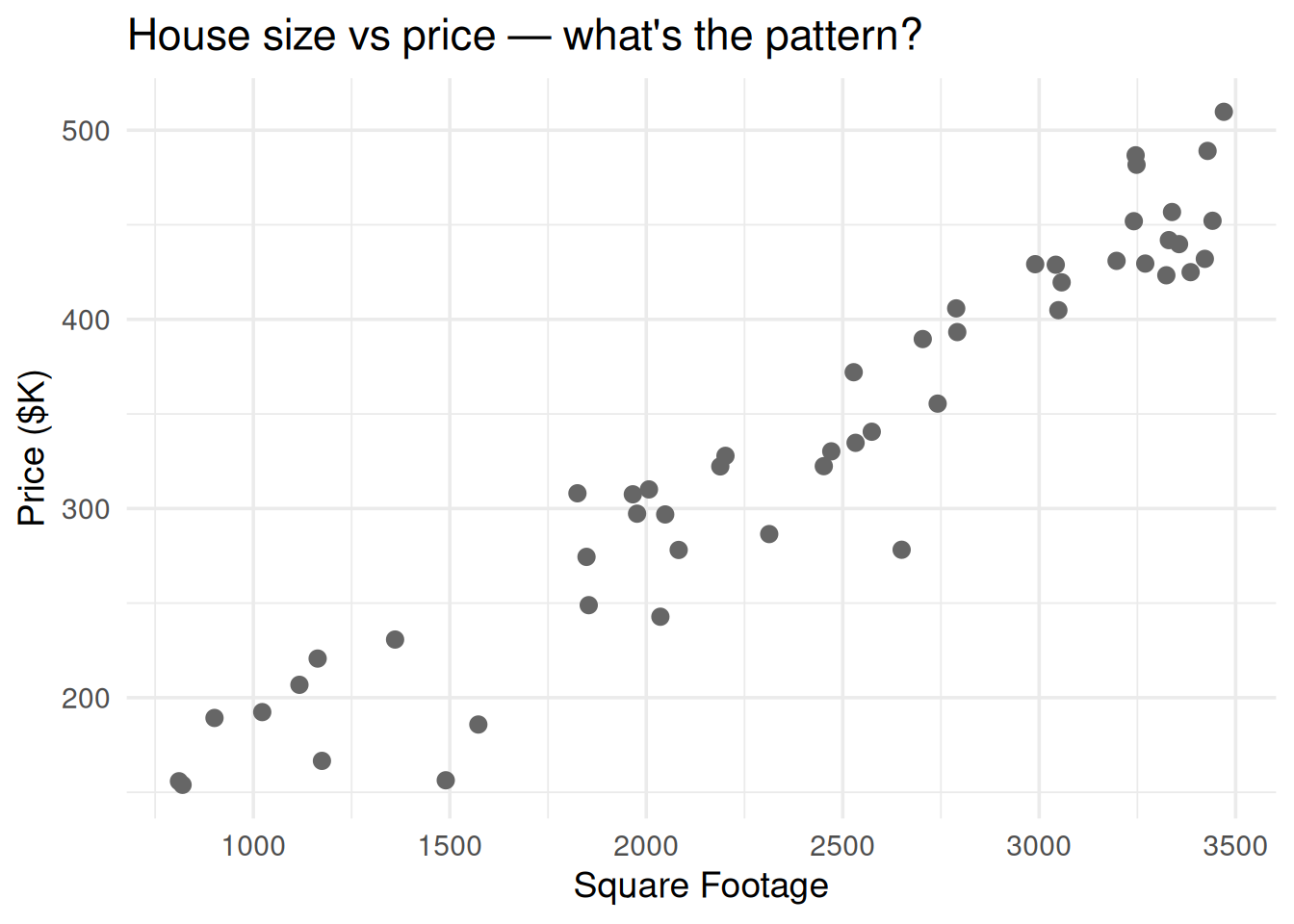
library(ggplot2)set.seed(42)n <-50sqft <-runif(n, 800, 3500)price <-50+0.12* sqft +rnorm(n, 0, 30)df <-data.frame(sqft = sqft, price = price)ggplot(df, aes(sqft, price)) +geom_point(size =2.5, color ="gray40") +theme_minimal(base_size =14) +labs(x ="Square Footage", y ="Price ($K)",title ="House size vs price — what's the pattern?")
Figure 1: Each dot is a house. Can you draw a line that captures the relationship?
2. The Formula: A Line Through the Data
\[y = a_0 + a_1 x_1 + \epsilon\]
Symbol
What it is
Plain English
\(y\)
Response variable
What you’re predicting (price)
\(x_1\)
Predictor variable
What you’re using to predict (sqft)
\(a_0\)
Intercept
Predicted \(y\) when \(x = 0\) (the baseline)
\(a_1\)
Coefficient (slope)
How much \(y\) changes per unit increase in \(x\)
\(\epsilon\)
Error / residual
The noise — what the line can’t explain
\(a_1\) is the key number. If \(a_1 = 0.12\), every extra square foot adds $120 to the predicted price.
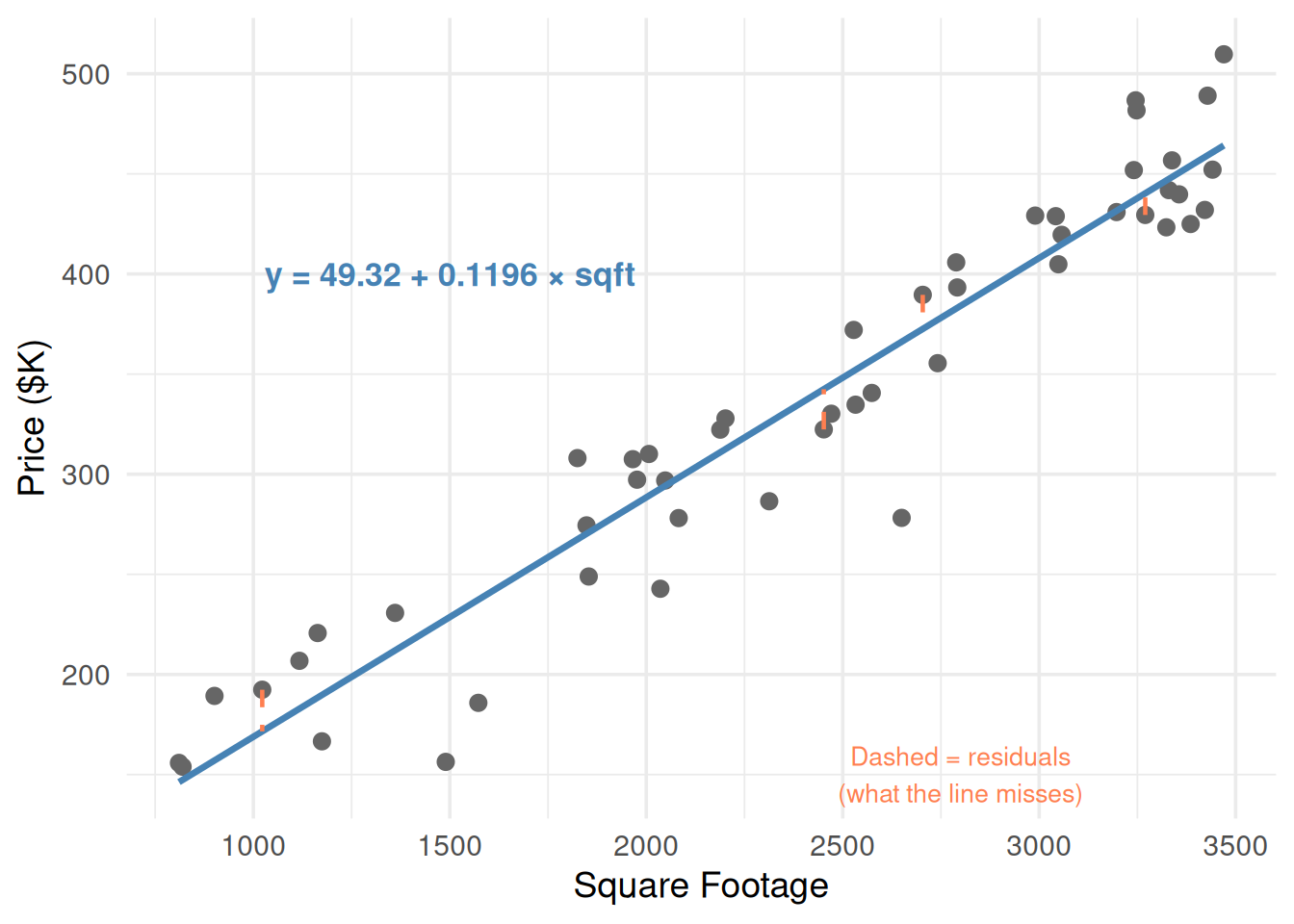
fit <-lm(price ~ sqft, data = df)a0 <-round(coef(fit)[1], 2)a1 <-round(coef(fit)[2], 4)ggplot(df, aes(sqft, price)) +geom_point(size =2.5, color ="gray40") +geom_smooth(method ="lm", se =FALSE, color ="steelblue", linewidth =1.2) +# Show residuals for a few pointsgeom_segment(data = df[c(1, 10, 25, 40), ],aes(x = sqft, y = price,xend = sqft, yend =predict(fit)[c(1, 10, 25, 40)]),color ="coral", linetype ="dashed", linewidth =0.8) +annotate("text", x =1500, y =400,label =paste0("y = ", a0, " + ", a1, " × sqft"),size =4.5, fontface ="bold", color ="steelblue") +annotate("text", x =2800, y =150,label ="Dashed = residuals\n(what the line misses)",color ="coral", size =3.5) +theme_minimal(base_size =14) +labs(x ="Square Footage", y ="Price ($K)")
`geom_smooth()` using formula = 'y ~ x'
Figure 2: The regression line minimizes the total squared distance from points to the line
3. How the Line Is Fit: Least Squares
Regression finds the line that minimizes the sum of squared residuals:
Why squared? Squaring does two things: it makes all errors positive (so they don’t cancel out) and it penalizes big errors more than small ones.
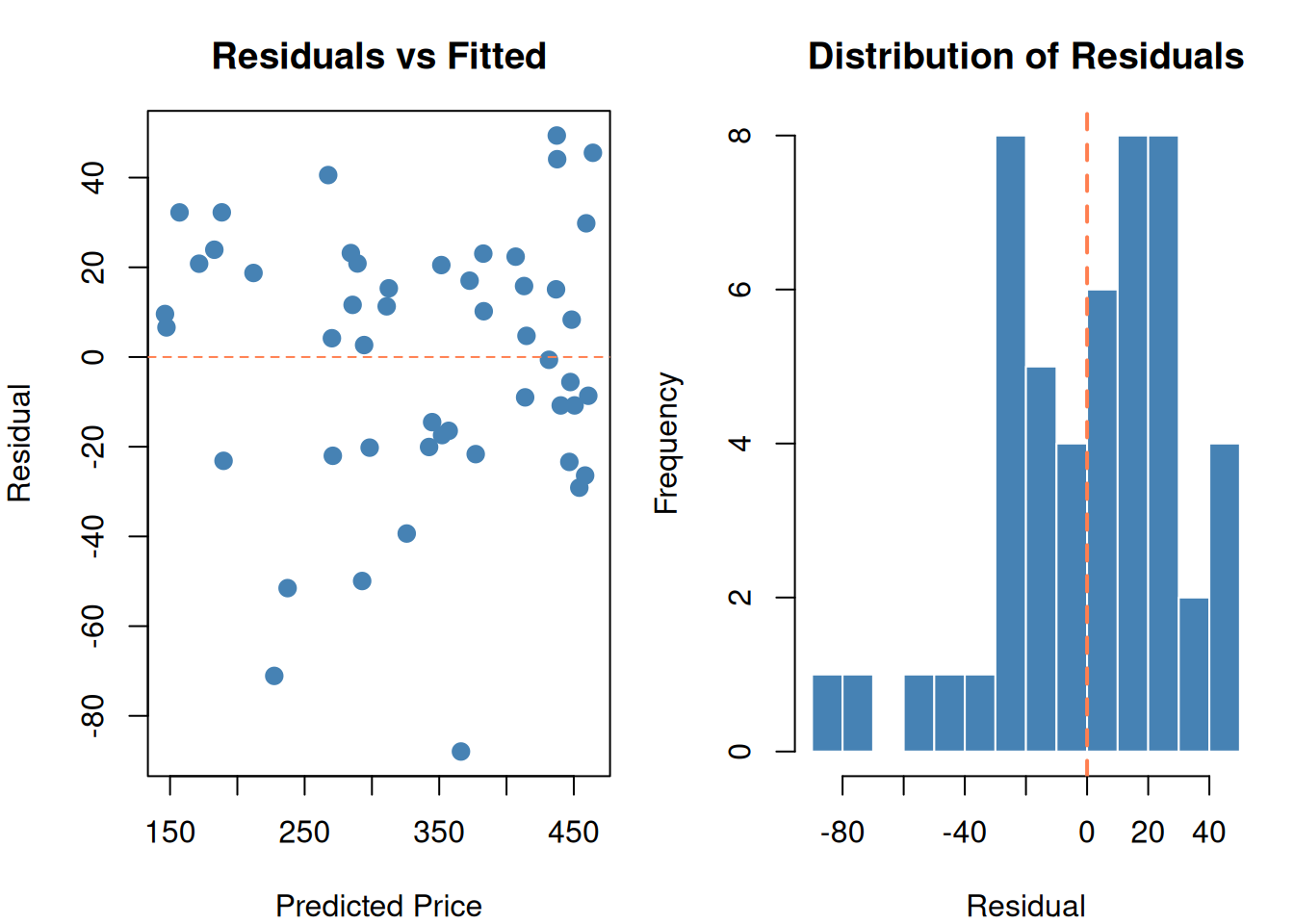
df$predicted <-predict(fit)df$residual <- df$price - df$predictedpar(mfrow =c(1, 2), mar =c(4, 4, 3, 1))# Residual plotplot(df$predicted, df$residual,pch =19, col ="steelblue", cex =1.2,main ="Residuals vs Fitted",xlab ="Predicted Price", ylab ="Residual")abline(h =0, lty =2, col ="coral")# Residual histogramhist(df$residual, breaks =12, col ="steelblue", border ="white",main ="Distribution of Residuals",xlab ="Residual")abline(v =0, col ="coral", lwd =2, lty =2)par(mfrow =c(1, 1))
Figure 3: Residuals = actual minus predicted. We minimize the sum of their squares.
Good residuals should be:
Centered at zero (no systematic over/under-prediction)
Randomly scattered (no pattern in the residual plot)
Roughly normal (bell-shaped histogram)
If you see a curve in the residual plot → your model is missing a non-linear relationship. If you see a funnel shape → the variance isn’t constant (heteroscedasticity → Box-Cox, Module 9).
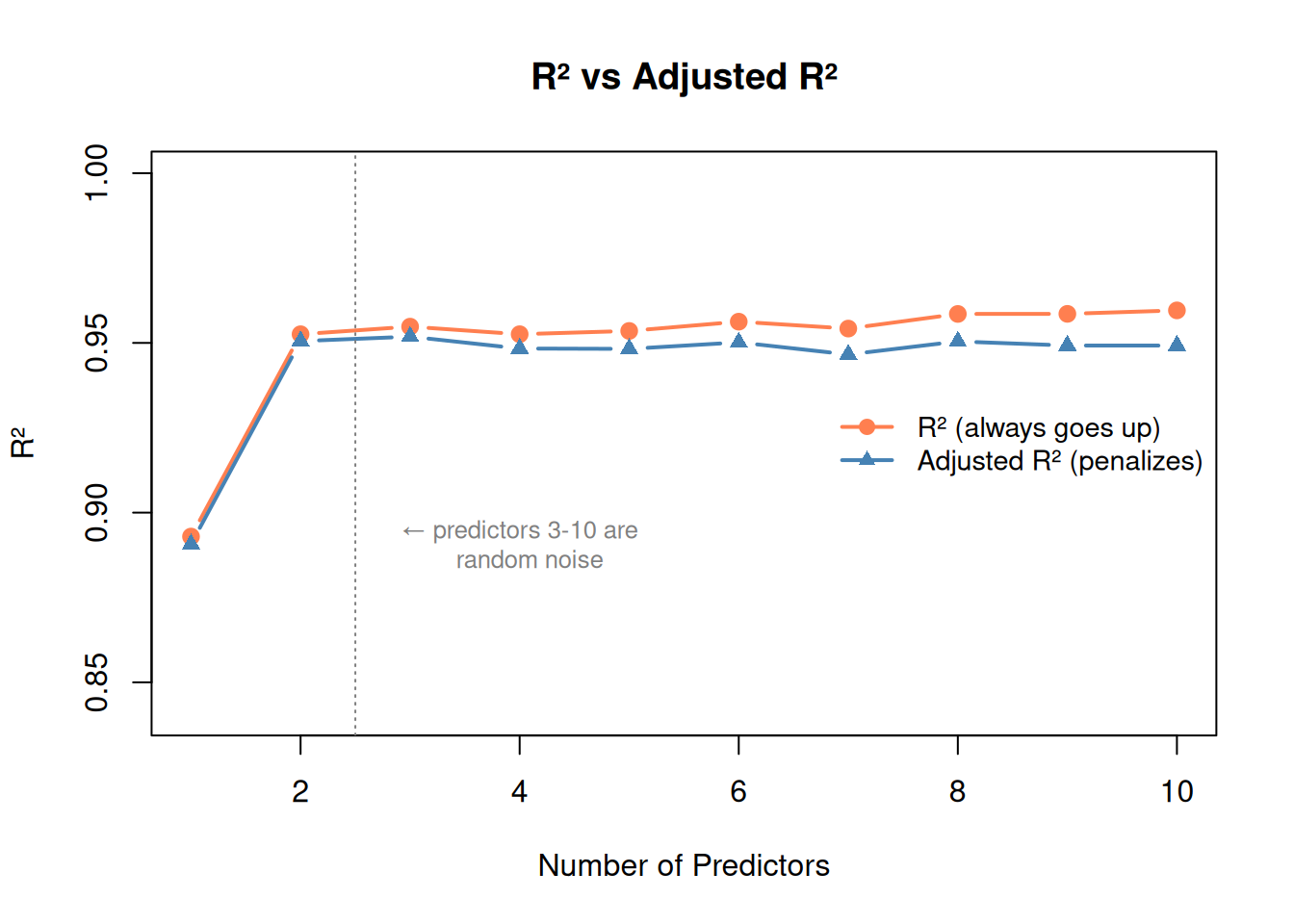
\(R^2\)always increases when you add more predictors, even useless ones. A model with 50 predictors will always have higher \(R^2\) than one with 2 — that doesn’t mean it’s better.
Adjusted R-squared
Penalizes for adding predictors. It can go down if a new predictor doesn’t help enough to justify the added complexity.
where \(m\) = number of predictors, \(n\) = number of observations.
set.seed(42)# Start with good predictors, then add random noise columnsbase_data <- df2r2_vals <-numeric(10)adj_r2_vals <-numeric(10)for (num_pred in1:10) {if (num_pred <=2) { formula_str <-c("sqft", "sqft + bedrooms")[num_pred] } else {# Add random noise columnsfor (j in3:num_pred) { col_name <-paste0("noise", j) base_data[[col_name]] <-rnorm(n) } preds <-c("sqft", "bedrooms", paste0("noise", 3:num_pred)) formula_str <-paste(preds, collapse =" + ") } fit_test <-lm(as.formula(paste("price ~", formula_str)), data = base_data) r2_vals[num_pred] <-summary(fit_test)$r.squared adj_r2_vals[num_pred] <-summary(fit_test)$adj.r.squared}plot(1:10, r2_vals, type ="b", pch =19, col ="coral", lwd =2,ylim =c(min(adj_r2_vals) -0.05, 1),main ="R² vs Adjusted R²",xlab ="Number of Predictors", ylab ="R²")lines(1:10, adj_r2_vals, type ="b", pch =17, col ="steelblue", lwd =2)abline(v =2.5, lty =3, col ="gray50")text(4, min(adj_r2_vals), "← predictors 3-10 are\n random noise",col ="gray50", cex =0.8)legend("right", bty ="n",legend =c("R² (always goes up)", "Adjusted R² (penalizes)"),col =c("coral", "steelblue"), pch =c(19, 17), lwd =2, cex =0.9)
Figure 4: R² always goes up with more predictors. Adjusted R² reveals when they’re useless.
p-values: Is This Predictor Significant?
Each coefficient gets a p-value testing: “is this coefficient actually zero?”
p < 0.05: Statistically significant — this predictor likely matters
p > 0.05: Not significant — might be noise
# Add a useless predictordf2$shoe_size <-rnorm(n, 10, 2)fit_with_noise <-lm(price ~ sqft + bedrooms + shoe_size, data = df2)summary(fit_with_noise)
Call:
lm(formula = price ~ sqft + bedrooms + shoe_size, data = df2)

Residuals:
    Min      1Q  Median      3Q     Max
-46.764 -10.554   0.667  11.354  38.906

Coefficients:
             Estimate Std. Error t value Pr(>|t|)
(Intercept) 26.401459  16.501398   1.600   0.1165
sqft         0.091714   0.003262  28.120  < 2e-16 ***
bedrooms    15.021547   1.896971   7.919  3.9e-10 ***
shoe_size    2.233498   1.319233   1.693   0.0972 .
---
Signif. codes:  0 '***' 0.001 '**' 0.01 '*' 0.05 '.' 0.1 ' ' 1

Residual standard error: 18.33 on 46 degrees of freedom
Multiple R-squared:  0.9553,    Adjusted R-squared:  0.9524
F-statistic:   328 on 3 and 46 DF,  p-value: < 2.2e-16
Notice: sqft and bedrooms have tiny p-values (significant). shoe_size has a large p-value (not significant — it’s random noise, as expected).
WarningSignificance vs. Magnitude
A predictor can be statistically significant (low p-value) but practically meaningless if its coefficient is tiny. Always check both significance AND magnitude.
6. The #1 Common Pitfall: Correlation ≠ Causation
WarningCorrelation ≠ Causation
This is tested constantly. A regression model finds a relationship. Does that mean one thing causes the other? No.
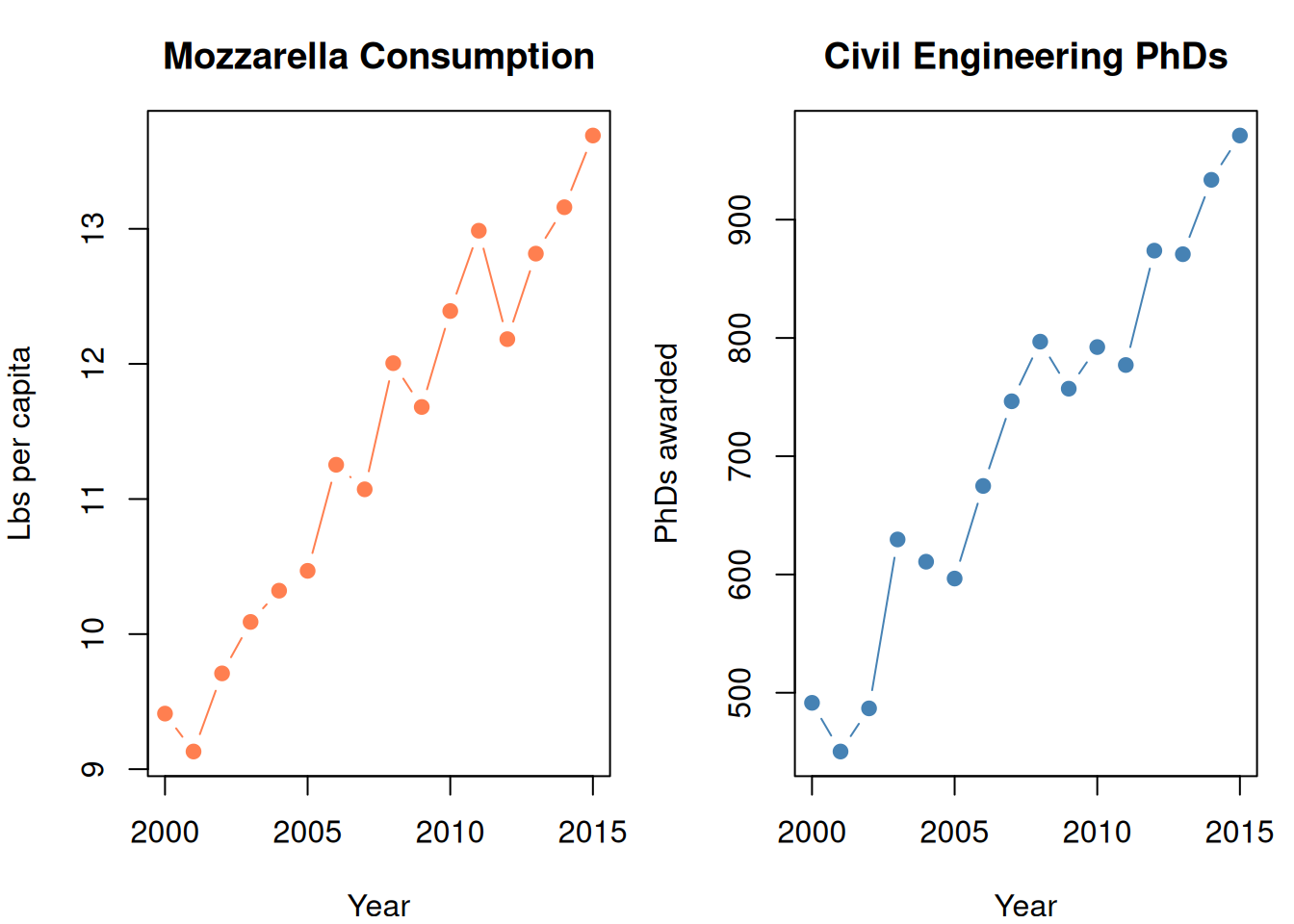
set.seed(42)years <-2000:2015# Two completely unrelated things that happen to trend upwardmozzarella <-9+0.3* (years -2000) +rnorm(16, 0, 0.3)phds <-500+30* (years -2000) +rnorm(16, 0, 30)par(mfrow =c(1, 2), mar =c(4, 4, 3, 1))plot(years, mozzarella, type ="b", pch =19, col ="coral",main ="Mozzarella Consumption",xlab ="Year", ylab ="Lbs per capita")plot(years, phds, type ="b", pch =19, col ="steelblue",main ="Civil Engineering PhDs",xlab ="Year", ylab ="PhDs awarded")par(mfrow =c(1, 1))cat(sprintf("Correlation: %.3f\n", cor(mozzarella, phds)))
Correlation: 0.959
cat("Highly correlated! But cheese doesn't cause PhDs.\n")
Highly correlated! But cheese doesn't cause PhDs.
cat("Both just happen to increase over time (confounding variable: time).")
Both just happen to increase over time (confounding variable: time).
Figure 5: Perfect correlation. Zero causation. Mozzarella doesn’t cause PhD awards.
What Causation Actually Requires
Temporal precedence: Cause comes before effect
Logical mechanism: A plausible reason WHY X would cause Y
No confounding: No third variable driving both
Regression proves NONE of these. It only shows correlation.
Reasoning:
“The model shows X and Y are correlated” ✓
“X causes Y” ✗
“The significant coefficient means X influences Y” ✗ (it means they move together)
7. Transformations: When a Straight Line Isn’t Enough
Non-linear Relationships
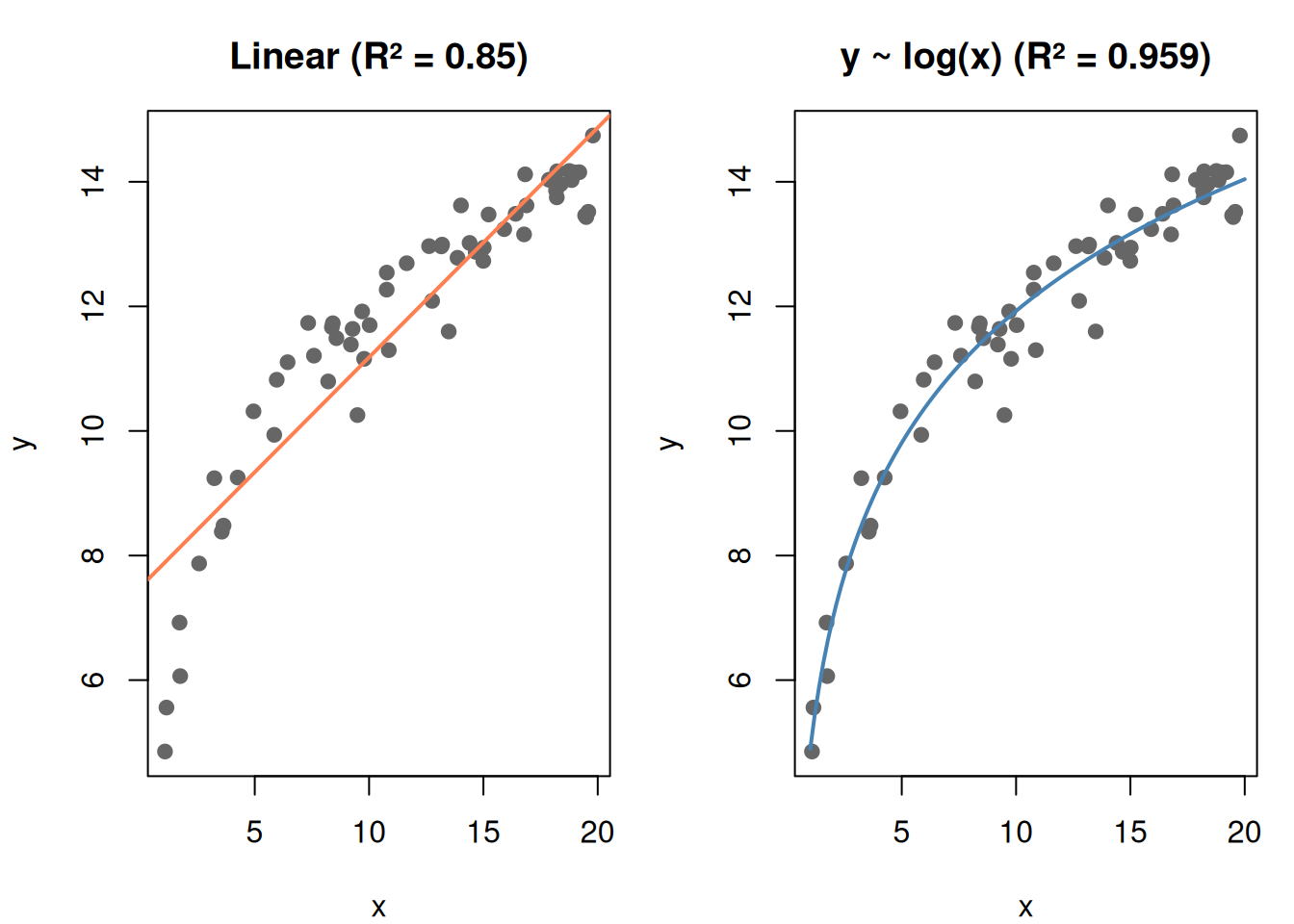
Real data isn’t always linear. You can transform predictors to capture curves:
set.seed(42)x <-runif(60, 1, 20)y_nonlinear <-5+3*log(x) +rnorm(60, 0, 0.5)df_nl <-data.frame(x = x, y = y_nonlinear)fit_linear <-lm(y ~ x, data = df_nl)fit_log <-lm(y ~log(x), data = df_nl)par(mfrow =c(1, 2), mar =c(4, 4, 3, 1))# Linear fit (bad)plot(x, y_nonlinear, pch =19, col ="gray40",main =paste0("Linear (R² = ", round(summary(fit_linear)$r.squared, 3), ")"),xlab ="x", ylab ="y")abline(fit_linear, col ="coral", lwd =2)# Log transform (good)plot(x, y_nonlinear, pch =19, col ="gray40",main =paste0("y ~ log(x) (R² = ", round(summary(fit_log)$r.squared, 3), ")"),xlab ="x", ylab ="y")x_seq <-seq(1, 20, length.out =100)lines(x_seq, predict(fit_log, newdata =data.frame(x = x_seq)),col ="steelblue", lwd =2)par(mfrow =c(1, 1))
Figure 6: Transforming predictors lets linear regression fit curves
Common transformations:
Transformation
When to use
\(\log(x)\)
Diminishing returns (more X helps less and less)
\(x^2\)
Quadratic relationship (up then down, or accelerating)
\(\sqrt{x}\)
Similar to log, less aggressive
\(x_1 \cdot x_2\)
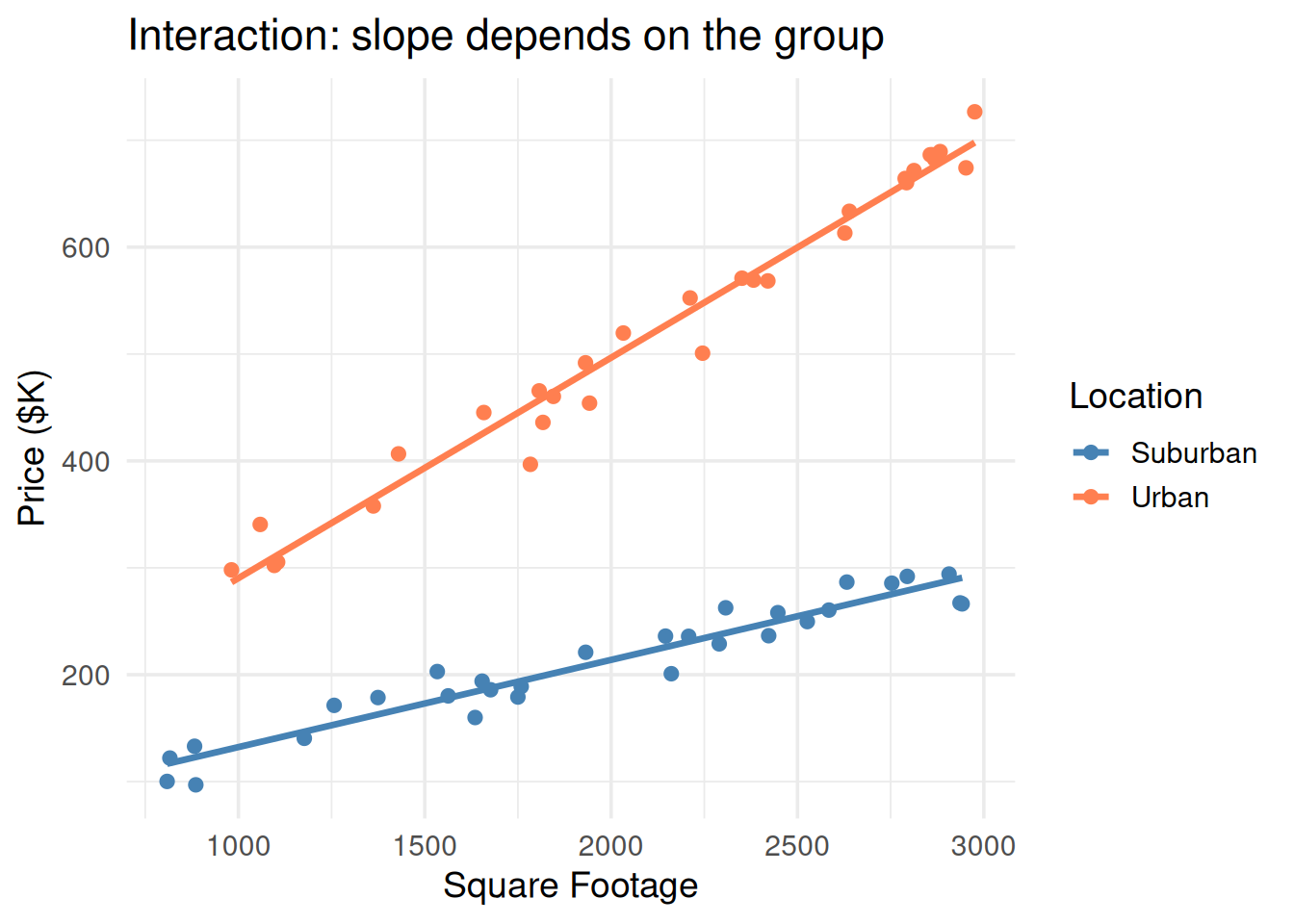
Interaction — effect of \(x_1\) depends on \(x_2\)
Interaction Terms
“The effect of square footage depends on the neighborhood.”